
AuthorTom Gandhi
LinkedIn
Are you preparing to migrate to Shopify from an alternative CMS, migrate another domain into Shopify, migrate a WordPress site to Shopify or migrate another Shopify Store into your existing Shopify?
Over the past 5 years, we’ve been trusted by a lot of eCommerce brands, including Pooch & Mutt, Swyft, Antler and Beyond Retro, to conduct their CMS migration into Shopify.
A website migration can be a complex and time-consuming process that puts traffic, visibility and revenue at risk if not managed carefully. And with very little documentation online about how to actually do it and what happens when you do, the stakes are even higher
To understand the process, what to expect and how to navigate it with minimal disruption, read on!
Disclaimer: To help you contextualise the process, we’ve used a theoretical migration example throughout this guide.
Table of Contents
- Awareness & Initial Considerations
- The Redirect Process
- Migration Considerations for Go-Live
- Testing Success
- How Long Will It Take to Swap the New Domain & URLs?
- Common Issues Identified When Moving To Shopify
- Common Issues When Migrating
- Summary
Awareness & Initial Considerations
We’ve based this example on a domain migration - luxurygoods.co.uk is becoming luxurygoods.com. In addition, the paths are changing - /collections/coats is to become /collections/mens-coats, so we’ll need to redirect map the current collections, products and any other changes from the existing location to the new location.
The initial stages:
- Domain acquisition - If not already complete, acquire luxurygoods.com
- Hosting - Once acquired, consider whether the new domain has been propagated on the host, e.g. GoDaddy, Namescheap or similar. This process can take up to 5-7 days, so make sure to factor it in. Typically, these two steps are completed simultaneously via GoDaddy or similar.
- Domain propagation on Shopify store - You’ll need to add the new domain to your existing Shopify store
- Settings > Domains > connect secondary domain
- You’ll have to wait also for this to propagate. Note: Make sure the new domain isn’t automatically set to redirect once it connects, as this can happen without checking, e.g. once propagated, the new domain might immediately redirect to the existing domain luxurygoods.com 301 REDIRECTS to luxurygoods.co.uk
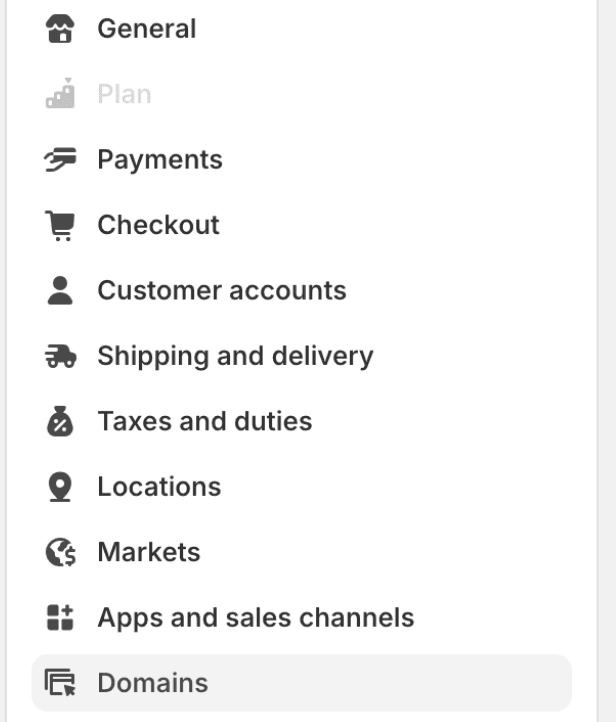
NOTE: Should you want to retain www., but your existing store does not use www., you need to make sure not to include www. in the new domain you’ve added when connecting the new domain, as it would cause a redirect to www.
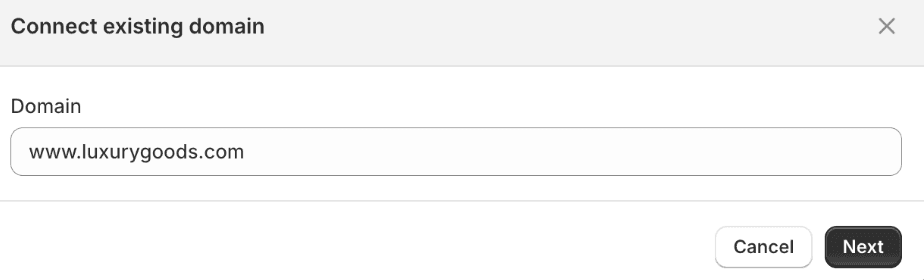
If this was added and set to the primary domain, it would result in the www. being applied.
- Ensure you have exported all on-page content and metadata - This is required to import the same content onto the new site to minimise the loss of SEO value.
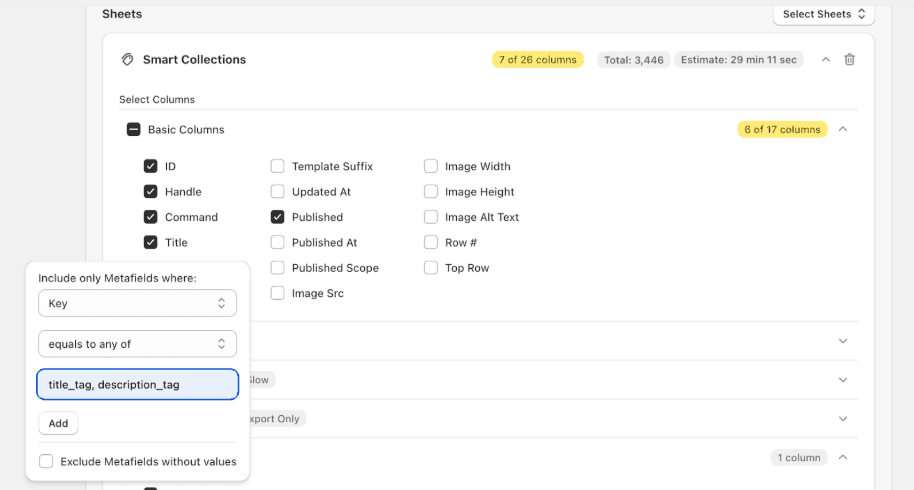
- If you don’t already have Matrixify installed, we highly recommend you install it, as this will hugely expedite the process.
- Once downloaded, export with similar parameters to the below, adding the title_tag and description_tag metafield filters to ensure the SEO Title & Description is exported.
- In the basic columns section, ensure the Body HTML is selected, as that will export any on-page copy, e.g. collection copy.
The Redirect Process
This section is often the most time-consuming as the landscape changes as decisions are made. For the benefit of this post, let’s assume all existing URL paths on luxurygoods.co.uk are changing to include ‘men’s’ in the URL, e.g. luxurygoods.co.uk/collections/coats will change to luxurygoods.com/collections/mens-coats, and all the existing collections will need to be redirected to the new location, factoring in men's.
- Extract all existing luxurygoods.co.uk collections. If you don’t have a bot like Screaming Frog, you can use this document; all you’ll need to do is;
- Navigate to your robots.txt file e.g. domain.com/robots.txt
- Find the reference to the sitemap.xml file & paste that in the browser
- You’ll then likely get multiple files, but for this example, luxurygoods.co.uk would look something like this (Shopify site)
- Paste that into the linked document, and it’ll pull up all the linked collections
- You’ll need to ensure that the new collections have been created utilising the /mens-xyz path so that when the domain switch happens, the new URL path resolves, rather than 404’s
- Once created, given this is a simple find and replace for the URL path to add in /mens before the existing URL path, you can duplicate the existing collection paths, and add in a new column with the new collection path side by side
- The Shopify CSV should be:
- Old URLs column name = redirect from
- New URLs column name = redirect to
- 8. For the avoidance of doubt;
- Column A Old URL example (redirect from) = luxurygoods.co.uk/collections/coats
- Column B New URL example (redirect to) = luxurygood.com/collections/mens-coats
Bonus: This is a good opportunity to assess whether pages are still needed during the cutover to avoid spending time re-creating pages that don’t perform or you’re no longer going to stock in the future.
If you decide to consolidate pages, ensure you have appropriate redirects set up for them - either to a new version or the closest equivalent page (often the parent collection).
Migration Considerations For Go-Live
On the day of your migration, there are some things to be aware of which might otherwise take you by surprise:
- Ensure the new collections with the new URLs are ready to be put live
- You’ll need to ensure your redirects from the prior stage have been imported into the store where you expect to see the changes reflect:
- You can do this by an import from a CSV file
- Go to Content
- Then Menus
- URL Redirects
- Import
- You will already have your redirect from and redirect to URLs ready to import from the prior stage
- Load these in and the redirects will be ready to fire once pages are archived and step 3 happens
- Go to domain settings and enable redirects from the luxurygoods.co.uk domain to the new domain luxurygoods.com. You can do this by swapping the old domain (.co.uk) to be the secondary, and the new domain (.com) to be the new primary domain
- The old URLs will need to be disabled/archived before they can be redirected, as on Shopify, you can’t redirect a live URL
- With the above 4 steps complete, you should now be seeing the redirects firing, and your old .co.uk non-mens URLs redirecting to the .com mens inclusive URLs
- You can download this chrome extension to track the redirect from the old URL to the new URL
- Finally, the way that Shopify redirects work (annoyingly) is in stages;
- Stage 1, the domain will redirect first, so your .co.uk will redirect to .com, but it’ll maintain the old URL path (which will be offline/archived)
- Stage 2, then uses the specified redirects you’ve imported which will result in the final destination resolving
- You’ll therefore see x2 redirects in the above tool
Bonus: This can be avoided should you have access to the htaccess file & cpanel to upload the redirects directly to the host, rather than using the native Shopify DNS. This will allow for a direct 1-to-1 redirect rather than the 2 that would naturally happen if using the native Shopify functionality.
Testing Success
- The best way to test whether your redirects are working en masse is to utilise a crawling simulator like Screaming Frog. This will allow you to upload the list of redirects from URLs into the tool, and it will crawl the list. At the end, you’ll have clarity that the end path (redirect to) URLs are resolving as expected, which you can then use to validate that the migration of the domain and path has been a success
- Any major issues will be flagged, if you’re seeing redirect loops (can find these by going to Reports > Redirects > All redirects
- Any 404’s will be flagged (which could prove whether some destination URLs are yet to be put live)
- You’ll need to create a new Google Search Console property for your new domain now that it is live. If you are using GTM or similar, it should automatically validate the property
- You can then head to settings (for the old domain) and to ‘Change of Address’
- You then choose the new property (.com) that is now live
- Check that the site has remained transactional by running test orders. Though this shouldn’t have changed, it might have
- Ensure that your GA is still working as expected. You shouldn’t necessarily need to change anything, as the old GA tracking code should have rolled over to the new domain. You will likely need to add your new domain to the existing GA property to ensure continuity of data tracking
How Long Will It Take to Swap to the New Domain & URLs?
It’s an impossible prediction to make, but the cut over will happen over time. What you’ll see is that you might have an initial increase in the number of URLs ranking for your brand, because you have 2 sites (in Google’s eyes) ranking for the same terms.
However, as Google picks up on the 301 redirects, it’ll start to drop the old domain out and replace it with the new; the position might take some time to recover, or it might be instantaneous. It’s difficult to predict.
Common Issues Identified When Moving to Shopify
As you’re now reaching the end of the article, it might be that you have already signed up with Shopify, so it might be too late if these things are an issue; however, if that’s not the case, there are some things to consider when moving over:
- Robots.txt - This was never editable, but now it is
- XML sitemaps - Generated by default (but improvements are needed to keep them clean with HTTP 200 pages only)
- x2 Product URLs - Long product URL /collections/collection-name/products/product-name & Short product URL /products/product-name
- Breadcrumbs - By default use the long product URL to form the breadcrumb trail. To get a static breadcrumb, you need to build breadcrumbs using metafields, which will enable you to have a static breadcrumb for each product, no matter where it was navigated to from
- Forced URL structure - you have no choice but to use /collections/ for categories, and /products/ for products
- Blog - Not the best blog for UX or design, and functionality isn't as advanced or customisable - you can set up /tagged/ groups if you want to categorise the blog into themes
Common Issues When Migrating
Some common issues we find when clients start migrating or looking into it, or disasters we have seen from things as simple as a ‘re-design’ that turn out to be a nightmare for performance.
- Design - Alone, this is normally ok, but if this results in significant amounts of JavaScript usage, or removal of text blocks, this could negatively impact site performance
- Content - Try to mitigate against changing on-site content as much as possible, as it alters the intent of the site or what the site has been known for. Slowly introduce content changes over time rather than all at once
- Consolidating URLs - Don’t forget to redirect old URLs, or closed down pages, to retain authority rather than losing it to 404s - this can be seriously impactful
- www. changing to non-www. - This will cause a migration before your migration, so be sure to tread carefully there
Summary
If you’re planning a website migration and this all sounds like a lot of work compared to your available resource, or you’re seeking a reliable SEO migration checklist, we can help. We haven’t even touched on selecting plug-ins, which are required to ensure functionality on the new site, among many other quirks you’re likely to encounter during a migration! Many lean on a website migration service to handle the process, work with you to ensure the new store is configured properly, and be accountable for sustaining performance post-migration.
Contact us to hear more about the eCommerce brands we've helped and how we can do the same for you!